Field Notes: building a small-model estimator that tells the truth
How Quillwright turns a photo and a voice note into a tradesperson’s estimate, using a handful of small models, running on your own machine, with no number ever invented by an LLM.
This was a project I built to learn, so these are field notes more than a launch post: what I tried, what I got wrong first, and the few things that turned out to matter.
The problem
Every tradesperson does the same unpaid hour after the real work: writing up the estimate. Parts, quantities, labor, a defensible total. Quillwright drafts that from a photo of the job plus a spoken note, and hands back an itemized estimate you can edit.
I set three constraints up front: only small models (≤32B), no third-party AI APIs, and no customer-facing number ever comes from a language model. The last one shaped almost every decision that followed.
The pipeline
There’s no single model doing the work. Each role in the pipeline is a small model picked for that job:
- Perception: MiniCPM-V reads the job photo into observations (a nameplate model number, “RUN CAPACITOR”).
- Brain: NVIDIA Nemotron-3-Nano runs a narrow tool-calling loop: which items, what quantities, when to stop.
- Audio: Cohere Transcribe turns the voice note into text on-device.
- Multilingual: Cohere Aya translates the customer-facing copy (descriptions only, never the numbers).
- Embedding: a small embedder powers recall of similar past jobs.
The brain’s tool surface is tiny: basically add a priced item and finish. Keeping it that narrow is what let a 4B model be reliable. It does routing and judgment, not arithmetic.
Facts-from-Tools
The core rule: any number that reaches the customer (price, quantity, tax, total) comes from a
tool (a catalog lookup, a deterministic compute) or from a human edit. Never from the model
generating text.
That’s obvious when the brain calls lookup_price instead of guessing “$40.” It mattered more
in places I didn’t expect:
- Edits re-run through a server-side recalc; the browser never computes its own total.
- Translation changes words, not digits.
- Reading a supplier quote produces proposed line items; a price only goes customer-facing once a human confirms it.
- The refinement chat keeps a sanitized history: the model sees what you asked (“make it 2 hours”) but pulls numbers from the current line items, so a stale dollar figure can’t leak back in.
The eval
I ran the agent by hand on a handful of jobs and it looked perfect. Then I wrote an eval set and scored it properly.
Item F1: 0.367.
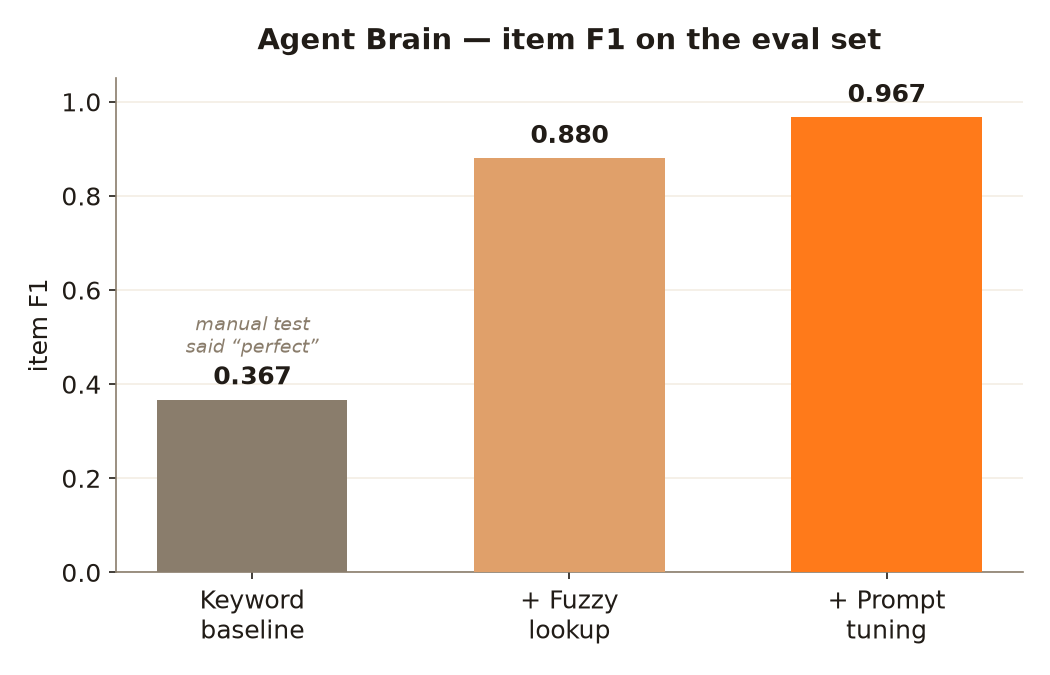
My manual testing had been feeding it the cases I already knew it handled. The eval set didn’t. Two fixes, both measured:
- Fuzzy catalog lookup so “refrigerant” finds
refrigerant_r410a. F1 jumped to 0.880. - Prompt tuning the tool-calling, up to 0.967, with quantity accuracy going from 0.40 to 1.00.
The number worth remembering is the 0.37, not the 0.97. Writing the eval before trusting the demo is the main habit I took away from the project.
Memory
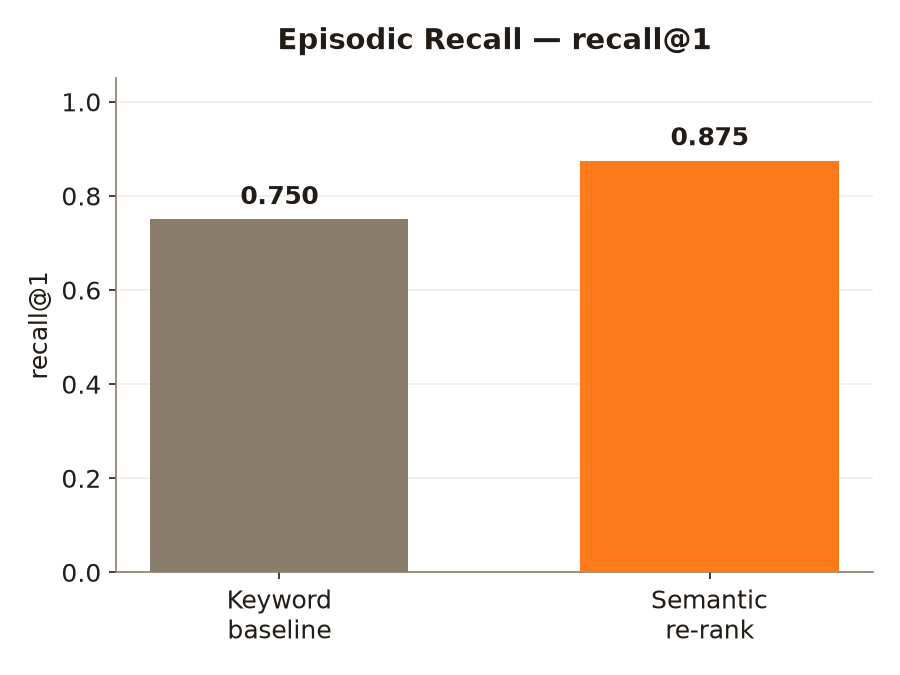
Quillwright recalls similar past jobs to inform a new estimate. My first version used keyword matching: recall@1 = 0.750. Swapping in a small embedder for a semantic re-rank moved it to 0.875, with one miss left in, because a benchmark with no failures isn’t one I’d trust.
Fine-tuning a small vision model
The artifact I’m proudest of is a MiniCPM-V LoRA fine-tune. On the public CORD receipt benchmark, the tune lifted item F1 from 0.588 → 0.681. But CORD is receipts, not trade invoices, so I also generated a synthetic set of trade invoices from a real 381-entry catalog and fine-tuned on that. In-distribution, it went from 0.703 → 0.933, with price accuracy at 1.00.
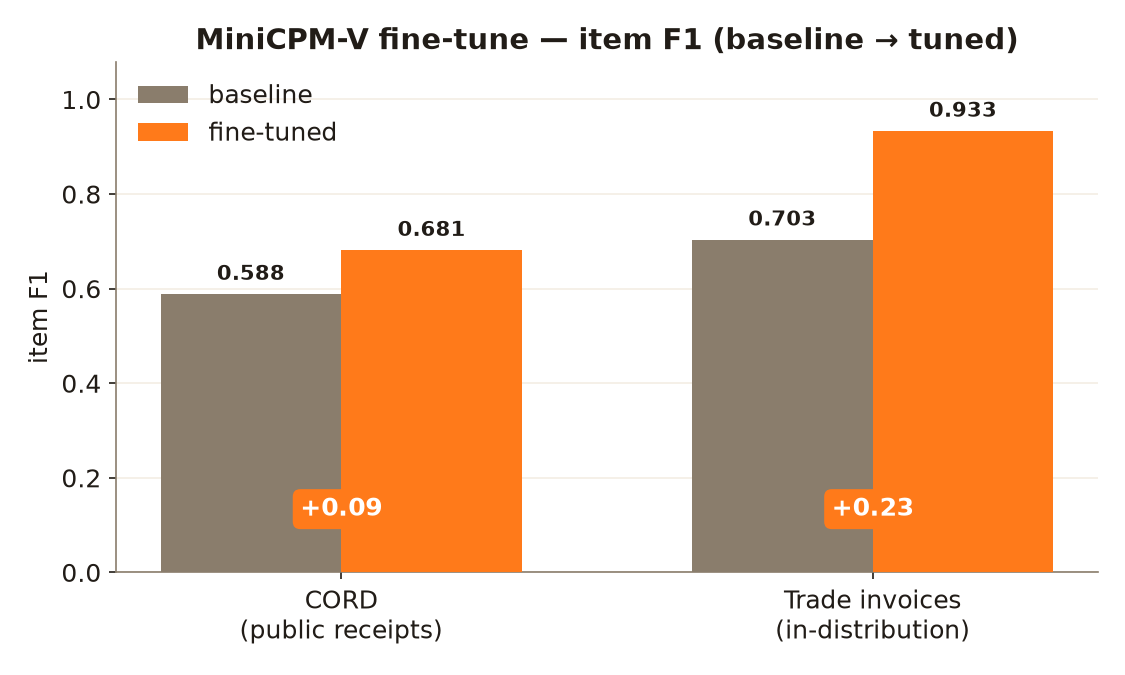
A small model fine-tuned on the actual domain closes most of the gap to a clean read. The +0.09 on CORD is the harder, out-of-domain number, and I report it alongside.
Artifacts
Both LoRA adapters are on the Hub, and every number above is reproducible from the eval scripts in the repo:
Aarya2004/minicpmv-trade-lora: the in-domain trade-invoice tune (0.703 → 0.933).Aarya2004/minicpmv-cord-lora: the CORD baseline (0.588 → 0.681).
| Metric | Before | After |
|---|---|---|
| Agent Brain item F1 | 0.367 | 0.967 |
| Episodic recall@1 | 0.750 | 0.875 |
| MiniCPM-V item F1 (trade, in-domain) | 0.703 | 0.933 |
| MiniCPM-V item F1 (CORD, OOD) | 0.588 | 0.681 |
Quillwright was built for the Build Small Hackathon (Backyard AI track):
- Code: github.com/Aarya2004/Quillwright
- Demo: a walkthrough
- Full write-up: on Dev.to
- Thread: the project on X
Running on your own machine
There are two ways to run it. Locally, it uses open small models with no third-party AI APIs, running on the dev machine through Ollama / llama.cpp. To check it really worked offline I turned off Wi-Fi and recorded an estimate completing.
The hosted demo runs the exact same agent loop on Modal GPUs with bigger models: a Nemotron-3-Nano 30B brain, Nemotron-Omni for vision and audio, and Aya-Expanse for multilingual. The Facts-from-Tools rule is identical; the larger models just have more room. Switching between the two is one env var, so the brain can go from a 4B on a laptop to a 30B on a GPU without any changes to the agent code.
| Role | 🔒 Local | ⚡ Hosted (Modal) |
|---|---|---|
| Brain | Nemotron-3-Nano 4B (NVIDIA) | Nemotron-3-Nano 30B (NVIDIA) |
| Perception | MiniCPM-V (OpenBMB) | Nemotron-Omni 30B (NVIDIA) |
| Audio | Cohere Transcribe (on-device) | Nemotron-Omni 30B (NVIDIA) |
| Multilingual | Aya (Cohere) | Aya-Expanse 8B (Cohere) |
| Embedding | on-device (sentence-transformers) | same on-device path |
| Runs offline? | ✅ Yes | ❌ No, hosted GPU endpoints |
| Cost / GPU | $0, your hardware | scales to zero when idle |
I tried to keep features from claiming more than they do. “Finalize & Send” actually texts or emails the estimate when you run it locally with your own provider credentials; on the public demo it only drafts the message and tells you nothing was sent.
Three ways in
Each capture path lands in the same pipeline:
- The Workspace: type or paste a note, add a photo, watch it draft live.
- Call a phone number: describe the job out loud; it transcribes, drafts the estimate, reads the total back, and texts you the PDF. A human approves later.
- Scan a QR: capture a photo and voice note on your phone; the desktop drafts it on screen.
What I took away
- Write the eval before you trust the demo. 0.37 was the most useful number in the build.
- Keep the model’s job small. The brain is reliable because it never touches arithmetic.
- Make the honesty a code path, not a promise. The model can’t emit a number because there’s no path for it to, on any capture surface.
Quillwright: tell it about the job; it drafts the estimate.